
Ask ALEX: How to create a .zip archive file
Tips for common ways you might use create a .zip archive file
Mac OS
Name your folder clearly; we suggest a format of “CompanyName-AskALEX”
Right-click on the folder that contains all of your PDF files for Ask ALEX and select “Compress”
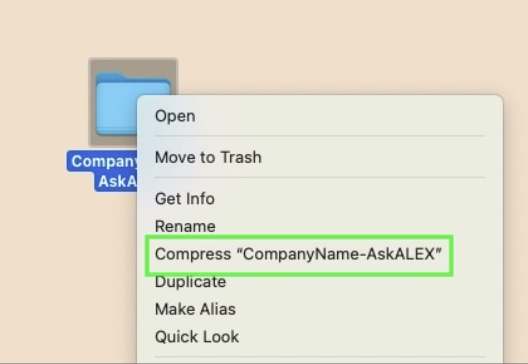
Your .zip archive file will be created in the same space your original folder is located
Windows PC
Name your folder clearly; we suggest a format of “CompanyName-AskALEX”
Right-click on the folder that contains all of your PDF files for Ask ALEX and select “Compress to” and choose ZIP file
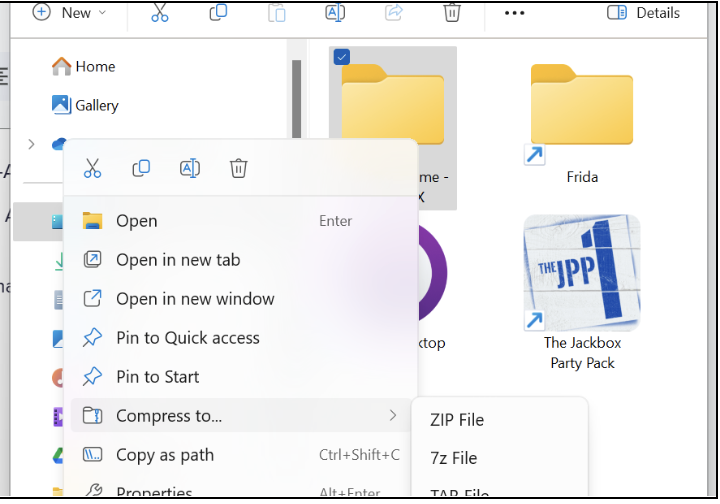
Your .zip archive file will be created in the same space your original folder is located
Google Drive
Select all the documents in your folder that should be included in Ask ALEX (or select the whole folder)
Click on the three dot menu and select "Download"
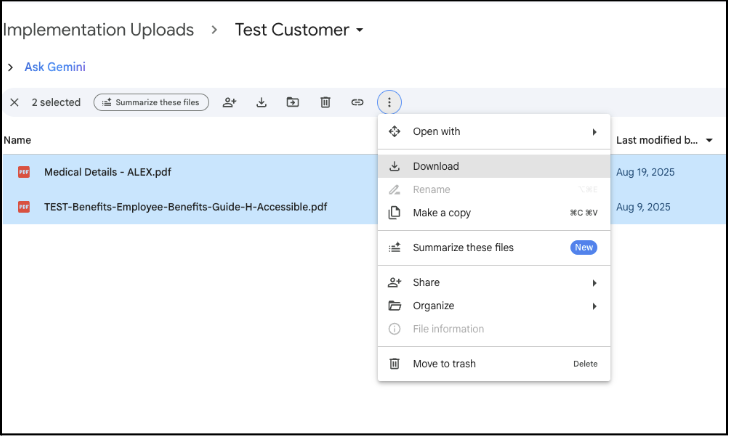
Your .zip archive file will download to your computer, typically in your Downloads folder or your desktop. Rename this file to “CompanyName-AskALEX” before you upload it to Builder.