
Surest, SimplePay, and Coupe "no-deductible" plans
If your client offers Surest, SimplePay, or Coupe medical plans you'll be able to configure these along side the other more traditional plans just with a few differences.
Navigate to Insurance>>Medical>>Medical Plans. Open the correct medical plan's General tab.
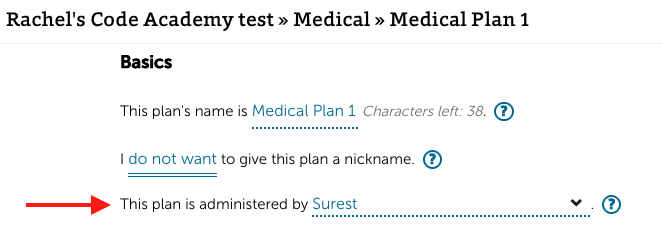
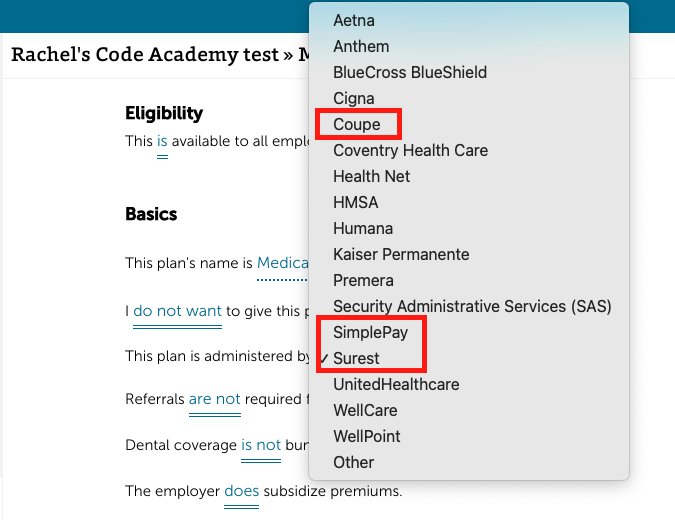
Under the Basics section find the toggle, "This plan is administered by..." and open the dropdown. Select either Surest, Coupe, or SimplePay depending on what type of plan it is.
Under the Procedures tab of the medical plan, for each listed procedure, set the payment type as "copay with range". You can then set the minimum and maximum copay amounts for each procedure. You'll also want to indicate the specific copay amount ALEX will use to calculate costs.
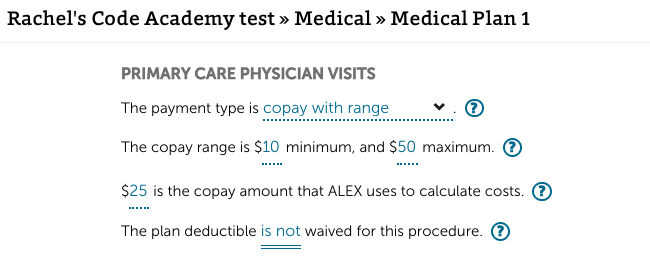
Note: The "copay with range" payment type for procedures is only compatible with medical plans set as Surest, Coupe, or SimplePay as in step 2.
In ALEX, the copay range for all procedures will be shown on the side-by-side comparison page and when users ask ALEX to explain the plan. ALEX will use the set copay amount when estimating out-of-pocket spending costs.
There will also be built-in moments of additional education about the difference between Surest, Coupe, SimplePay plans vs. traditional medical plans when ALEX explains the plans.